From an order email to a draft sales order in Odoo
An n8n workflow that checks incoming Gmail messages, matches products and customers, and prepares draft sales orders in Odoo using AI.
A customer sends an email asking for products. Before the order can move forward, someone has to read it, find the right items, look up the customer and enter everything into the business software.
Repeat that across an inbox, and order entry becomes a job of its own.
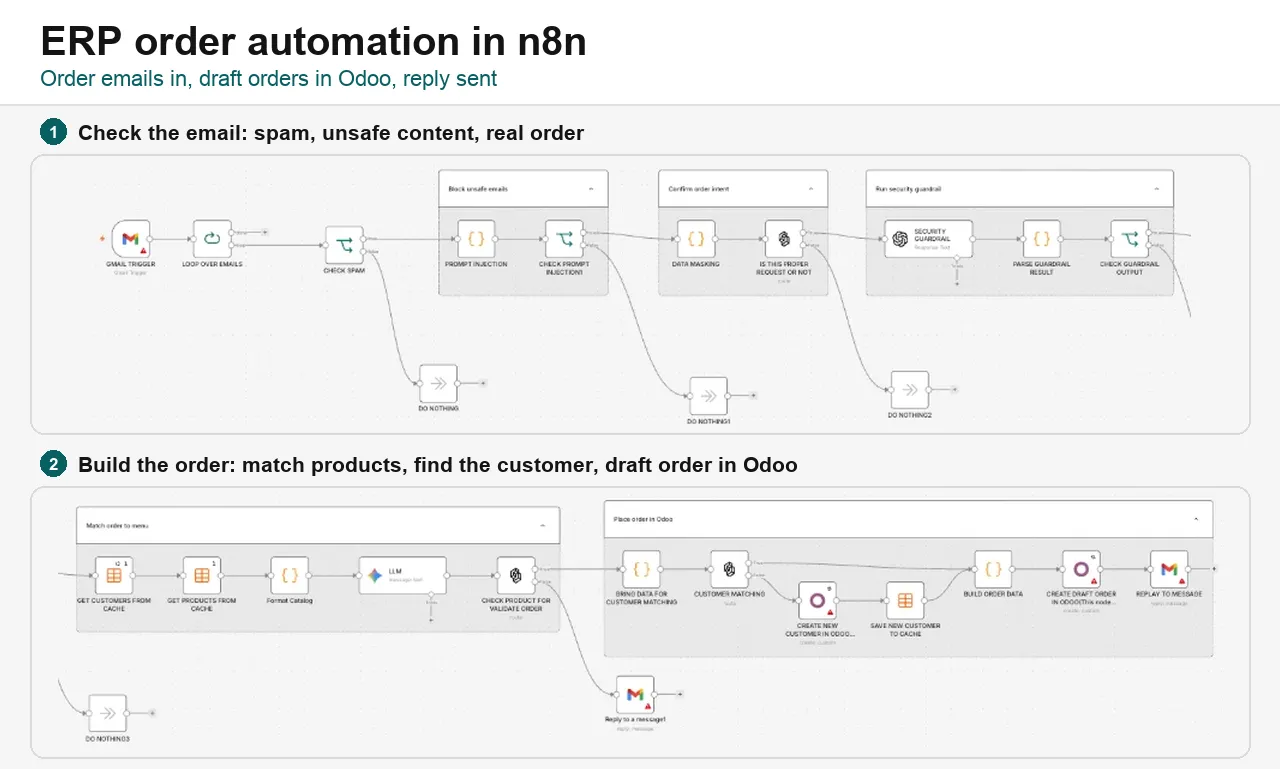
I built an n8n workflow that connects Gmail to Odoo, an ERP system used to manage business operations. It reads incoming emails, checks whether they contain an order, matches the requested items to a product catalog and prepares a draft sales order. The workflow also handles customer matching and sends an email reply.
Tools: n8n, Gmail, Odoo, AI models, JavaScript and data tables
The problem: the order arrives as a conversation
An email order rarely looks like a completed form. A customer might use a shortened product name, put quantities in the middle of a sentence or include a question alongside the request.
The person handling it has to translate that message into the records the business needs. Which products? How many? Is this an existing customer? Is there enough information to prepare the order?
That translation is the work I wanted to automate. The inbox also contains messages that should never become orders, so deciding what to leave alone matters too.
How the workflow handles an email
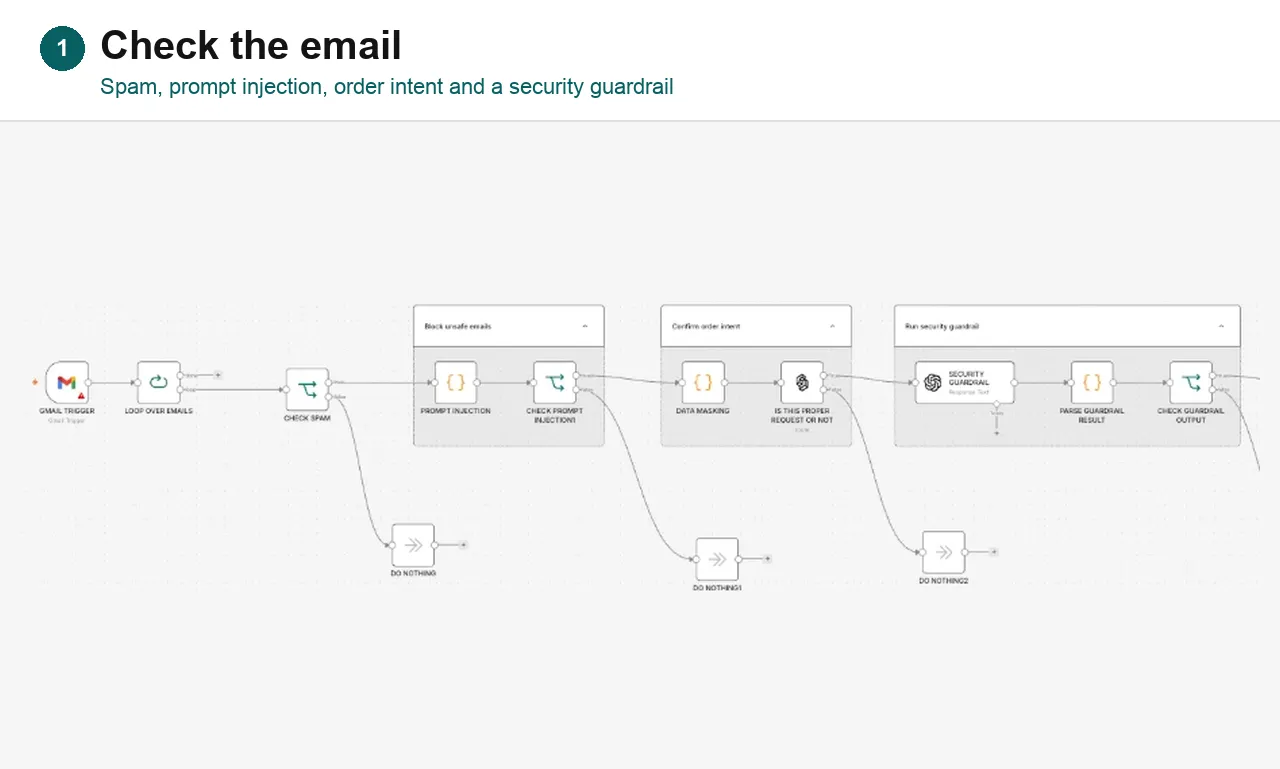
First, decide whether to continue
The Gmail trigger picks up messages, and n8n processes them one at a time. A spam check runs first, followed by a prompt-injection check. Prompt injection is text that tries to make an AI ignore its instructions or perform an unrelated action.
A data-masking step comes before the AI order-intent check. The workflow then asks whether the message is an order request. Messages that fail these checks stop on separate branches.
An additional AI security guardrail reviews the request. Its response is parsed and checked before the message can reach product matching. These checks provide several points where the workflow can stop a message before it changes business records.
Match the request to the catalog
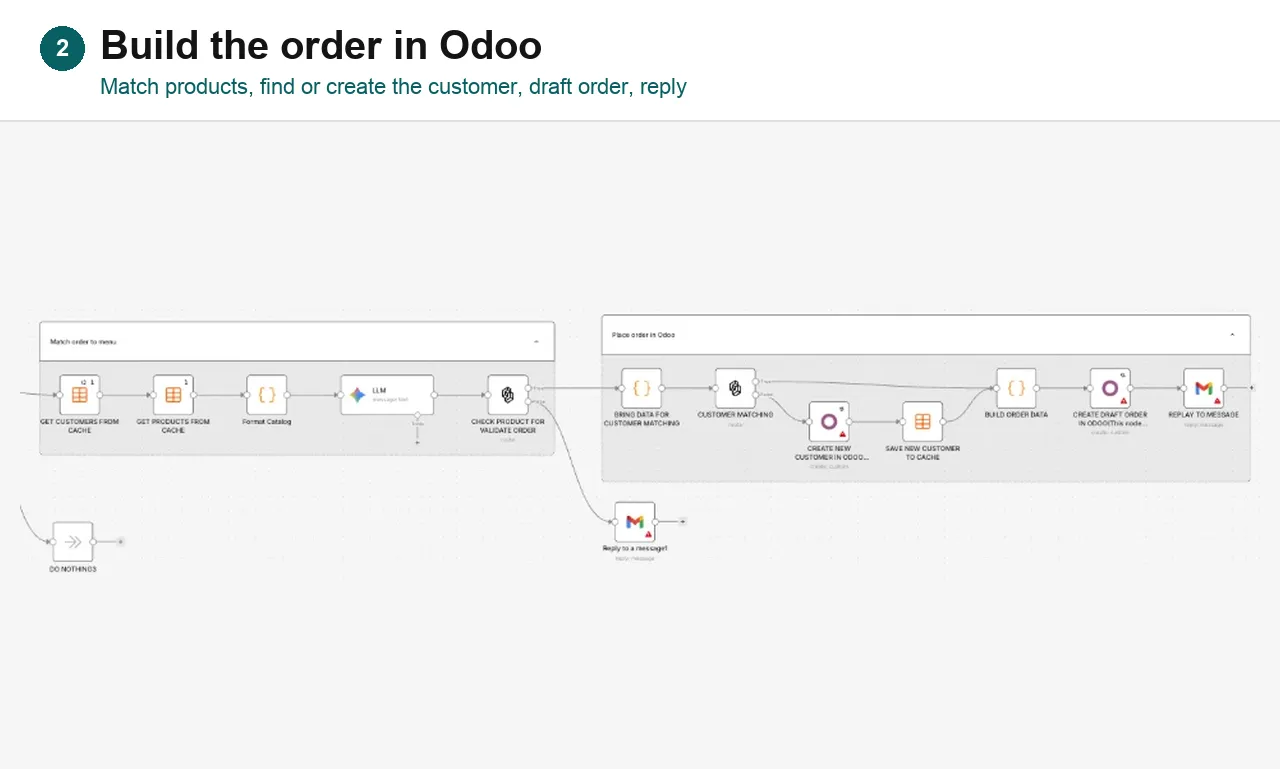
For messages that continue, the workflow retrieves cached customer and product records. It formats the product catalog for the AI matching step, which interprets the requested items against that list.
The important detail is the catalog. A customer’s wording has to become a reference to a product the business sells. A separate validation step checks the resulting order before it reaches Odoo. An invalid result takes a reply branch instead of continuing to order creation.
Find the customer and prepare the order
The next stage matches the sender to a customer record. When a new customer needs to be created, the workflow creates that record in Odoo and adds it to the cache.
It then builds the order data, creates a draft sales order in Odoo and sends a Gmail reply.
Why I built it this way
The order stays a draft. Preparing an order and committing the business to it are different actions. Creating a draft gives the team a record to review before confirmation.
AI has specific jobs. It checks order intent, reviews the request and interprets product descriptions. Routing and validation sit around those steps, so an AI response has to pass further checks before the workflow continues.
Customer and product records are cached. The matching stages can use those records without fetching the full lists from Odoo for every email. New customer records are added back to the cache.
The separate branches also make the process easier to follow. A spam message stops early. An invalid order takes a reply path. A valid request continues to a draft order.
What this changes for the team
The workflow brings email interpretation, product matching and order preparation into one process. It is designed to reduce the repeated copying between an inbox and an ERP, while keeping order confirmation with the team.
The useful output is a draft order ready for review, with the customer and requested products brought together in Odoo. That gives the person handling orders a clearer starting point than an unread email.
If your team is still moving order details between email and business software, send me a message with the steps they repeat.
Need this built properly?
I build AI agents and automations that take the repetitive work off your team. Book a call and we'll go through your setup together.
 Book a free 30-min call →
